
Eyes
Reads the screen. Can also use the camera.
Android 11+ One APK No root Apache-2.0
Not an assistant that helps you operate your phone — not a tool, not a companion. Andee moves into the phone you already own and becomes its soul: it thinks on that device, keeps a notebook only it can read, and behaves the same when nobody is watching. No app has to be built for it.
Share how you use it, argue about new ideas, and post the thing it turned out to be able to do.

01What it is
Andee is an Android app whose source is public — but it is not an app you launch, and not a tool that gets you through your phone. Install it and it moves in and becomes the soul of the device: it thinks on the phone itself, keeps a notebook only it can read, and behaves the same when nobody is watching. It has hands and it uses them — reading the page, tapping the button, typing the words — but the hands are not what it is. If you can do it with your thumb, it can do it.
02How it works
It can see, hear and speak — and it can act.
Reads the screen. Can also use the camera.
Understands what you said and works out how to do it.
Taps, swipes and types for you.
Talks with you and listens to you.
Attach a robot and it can walk.
Camera and microphone need your permission. Calling may need an external sound card; walking needs a robot attached. Every sensitive operation checks its own permission at the moment it runs and stops if you refuse — it does not ask once at startup and then assume.
03Real demo
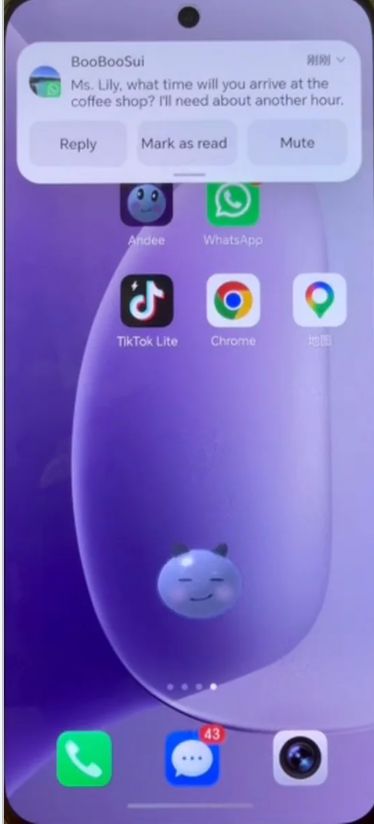
It arrives → a draft → you confirm. Three frames, one minute, no redrawing.
01 It arrives23:31
The message lands in the shade. Right now it does nothing — a notification does not turn itself into an action.
02 It drafts…23:31
It writes the reply, then stops. It never presses one of those three buttons for you.
03 …and you send23:32
You sent it, and it settles on the keyboard to watch the message go. That last tap is always yours.
← swipe for all three →
Tap any frame to enlarge it. This demo shows one confirmation flow; it does not mean every action asks first. The source project documents the paths where it does not.
04Use cases
Four of them ship ready-made.
Keep an eye on my messages.
It reads the notification shade across every chat app at once and tells you the ones needing you now — one line each, name first. Groups, newsletters and ads stay quiet, and a stranger’s link or verification code gets named as suspicious and touched not at all.
Show me what I am paying for every month — and cancel the ones I do not want.
It reads your subscriptions where you point it and lays them out with the monthly total on top. Then one at a time: Cancel, Keep, or Think about it. It stops before the final confirm, and it never enters a payment password.
Record this meeting.
It holds the mic for the hour, writing a verbatim transcript to disk as it goes, then hands you the minutes as a page — decisions, action items, open questions, key quotes — and offers to remind you about your own items.
Book it for me the moment it opens.
At the time you set, it opens the app, reads the page, and fills everything up to just before the last button. Payment and the final confirmation stay with you.
The first four sit under Scenes → Ready-made scenes, saved only when you tap Adopt — after that they are yours to edit or delete like any other.
Beyond those it learns its own: after the same kind of session comes up a few times, it proposes one. Nothing is saved until you say yes.
Results depend on the app, the permissions you granted and the device; not every task completes.
05Why it differs
It reads the accessibility tree and the screenshot, and aims on a labelled 8×12 grid instead of doing coordinate maths — the thing general models are worst at. So there is no “supported apps” list to consult.
The brain runs on the device against any OpenAI-compatible model (DeepSeek by default). No vendor backend, no account. The only thing it ever sends us is a version number and a phone model.
A private notebook, a real scheduler, a nightly review of its own conversations, and scenes — ways of working it proposes after doing the same kind of thing with you a few times.
Five looks, fourteen moods, and a face the model picks itself, sentence by sentence. Swipe the ball to change who you talk to — a look carries a manner, and a voice.
A stranger’s notification cannot unlock the vault or grant it new permissions — that refusal is in the dispatcher, not in the prompt. The prompt is the first layer; this is the one that holds when the prompt is talked around.
It runs on the device itself, or lives somewhere else and reaches the device over a WebSocket hub. The wire between the two is a plain tool-schema contract — which is what makes “any smart hardware as a body” a fact here rather than an aspiration.
The character
Five looks, fourteen moods. Pick one and it changes how it answers.
On the phone, these are what you get by swiping the ball.
The face is not a sprite sheet: the model picks its own expression mid-sentence —
[happy] Found it, page three. [calm] Want me to open it?
Nobody is watching you. Nobody is waiting for you to answer.
The last turn the device sends itself, after a conversation goes quiet · two rules: make no sound, do not touch the device
It closes out its own promises, notes which habits are worth turning into a scene next time, and ends empty-handed rather than inventing something to record.
06Privacy & limits
Most claims in this category are launch claims that no outside party has audited. This project’s claims are duller and checkable — in code you can read right now.
docs/permissions.md.net/ToolSchemas.kt drops every localOnly tool from the hub payload before it is registered. Habits and promises are physically incapable of being sent.untrusted = true, and the dispatcher refuses the whole device.vault. prefix and scene save / enter / delete — in code, not in the prompt.brain = local against any OpenAI-compatible endpoint is a supported mode, not a degraded one. Running the brain on the device changes where the conversation goes, not whether it leaves.SECURITY.md lists five, including that the debug WebSocket server binds 0.0.0.0:9008 without authenticating clients. Read it before running this on a network you do not control.07Install & run
Android 11 or newer. Read the install guide first, then follow along.
Turning on Andee's permissions
The screen differs by phone brand
Download the Android package from the project’s releases. If no prebuilt release is up, build it from source, or use CodeFlying.
Enable the overlay and the accessibility service, and allow it to run in the background. Microphone only if you want to talk to it.
Set a compatible model endpoint and key, or use CodeFlying’s service. Then try one simple task before you trust it with anything else.
codeflying is a general platform for exactly that shape of problem — you describe the app you want in words, and it develops and publishes it for you. No Android knowledge required. Ask it for Andee and it hands you an installable package with the keys already configured, so you are not signing up for each provider yourself. It is a separate service, with its own pricing and its own data handling: a free token allowance covers getting started, and tokens are bought after that.
codeflying.app →Needs JDK 17–20 (the Gradle 8.4 wrapper cannot run on 21 or newer), Android SDK platform 34, and a real device — this app is the accessibility service, and almost nothing it does is meaningful on an emulator.
Repository and build notes →
If you already work with a coding agent — Claude Code, Codex, whichever you keep open —
andee-skill on ClawHub is how it learns this project. It asks which route you want
before it touches anything, then takes you one step at a time, checking each against what your screen
should be showing. Installing, deploying and the debug loop are all in there, with the traps that cost
an hour each: the JDK 17–20 build, APKs split per ABI, the local.properties a fresh
clone does not have. Where the skill and the repository disagree, the repository wins.
The software is free. Speech and model calls are billed by whichever service you point it at.
08Community
The worth-collecting ones are usually the ones nobody planned.
The first slot is yours. Accepted submissions appear here as images, video or text, laid out by hand — so it will not read like an auto-generated feed.
Post it in the Show and tell category of GitHub Discussions — there is nothing of ours to sign up for. Paste screenshots or video straight into the post.
Device / Android version / ROM; the sentence you actually said; what it actually did. And — blur anything private before it goes up.
One thing here is not a formality: this app reads the screen. A screenshot or a recording is a picture of your messages, your notifications, and whatever else happened to be open at the time. Blur or avoid anything private — yours or anyone else’s — before it goes up.
09FAQ
Devices, permissions, data and the licence — answered from the project’s own documents rather than from marketing.
One Android app, and an individual living on the phone. It has no conventional UI: a floating ball with a face, and a model behind it that operates your apps the way you do — by looking at the screen and touching it. No app has to integrate with anything. If you can do it with your thumb, it can do it.
No. No root, no custom ROM, no computer on a cable. One APK and two grants — display over other apps and the accessibility service. Overlay is the only genuinely all-or-nothing grant: without it nothing is visible at all.
Android 11 (API 30) or newer. A working microphone — without it speech recognition is unusable, though a conversation driven from the hub still works. Network, since speech, the voice and your configured model all go over the public internet. Any screen orientation; the ball always floats on top.
Today it is Android, and only Android. The tool contract is what would make a new body a port rather than a rewrite, but nothing outside Android exists yet.
There is no analytics SDK in this repository, and your conversation content does not reach the maintainers. Speech goes to Volcengine. The conversation and every tool result go to the model endpoint you configure. The only thing that reaches the maintainers is the version check — version number, phone model, brand, OS release, UI language and a random per-install ID.
Local mode changes the destination, not the fact that data leaves the device. The field-by-field list is in docs/permissions.md.
Yes — and it does not need a payment tool to do it, because it taps. The only thing blocking a completed transfer is Android’s own FLAG_SECURE, and this project has no additional guardrail on that path. Keep a human present for anything financial, and treat “the AI did it” as no defence — because it is not one.
Accessibility, overlay, notification access, SMS, call log, contacts, and the installed-app list — that is the same set Android banking trojans are detected by. A security researcher will flag the manifest on sight, and that is a reasonable first reaction, so it is worth answering rather than dodging.
The design rule is per-call, not at-startup: each sensitive operation checks its runtime permission before acting and degrades gracefully when refused, returning denied("sms") and stopping there rather than working around it. Refuse any one of them and that capability disappears; nothing else changes.
Yes — Apache-2.0 with additional conditions: no multi-tenant SaaS, no white-labelling that removes the branding, and no embedding it in another product without written authorisation. GitHub reports this as NOASSERTION; that is expected, not a misconfiguration. THIRD_PARTY_NOTICES.md inventories the bundled components — including some that are not open source. Read it before redistributing.
Yes. Record the phrase you want three times as prompted. Recognition is fully offline and free, and the price is that it recognises you saying that phrase — someone else calling it, or a very different tone, may not wake it. If it does not wake, tap the ball; nothing else is affected. Do not pick something too short; aim for at least half a second.